Templates
Table of contents
Manage your rental properties simply and with confidence
The intuitive and efficient rental management software for modern landlords.
Free registrationTemplates
Feb 14, 2026
Managing Templates in Rentaflix
Learn how to create, manage, and use templates to streamline document generation for your rental properties.
Your Guide to Custom Templates in Rentaflix
Welcome to the Rentaflix templates documentation page! Rentaflix stands out in the property rentals management market by empowering users to fully customize their document templates, making it easy to tailor lease agreements, receipts, and more to their specific needs. Our robust template system allows you to generate documents with dynamic data, turning property details, tenancy specifics, and tenant information into automatically filled forms.
Rentaflix is continually evolving to enhance document personalization. Our team is actively working on features for dynamic table generation, image inclusion, and additional object types, such as transaction records, giving you greater flexibility in creating custom documents.
Guided steps
This guide offers a step-by-step overview of creating, enabling, and using custom document templates in Rentaflix. For illustration, we'll use a lease template to demonstrate each step, showing how you can tailor a template to meet specific needs and automate document creation effectively.
Preparing Your Lease Template
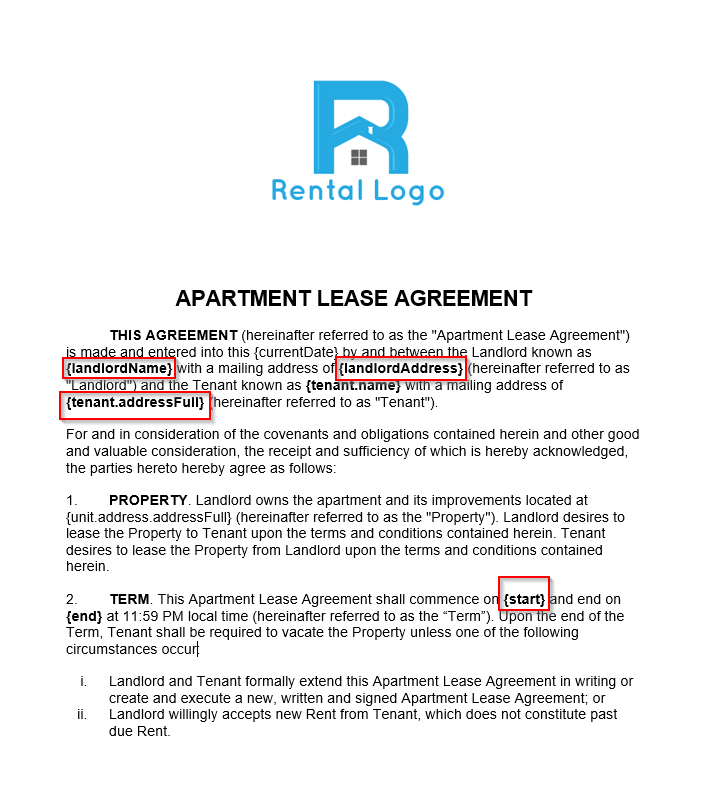
The lease template is a Microsoft Word document (.DOCX) where placeholders (field identifiers) are used for dynamic data.
Example Placeholders
Adding a New Template
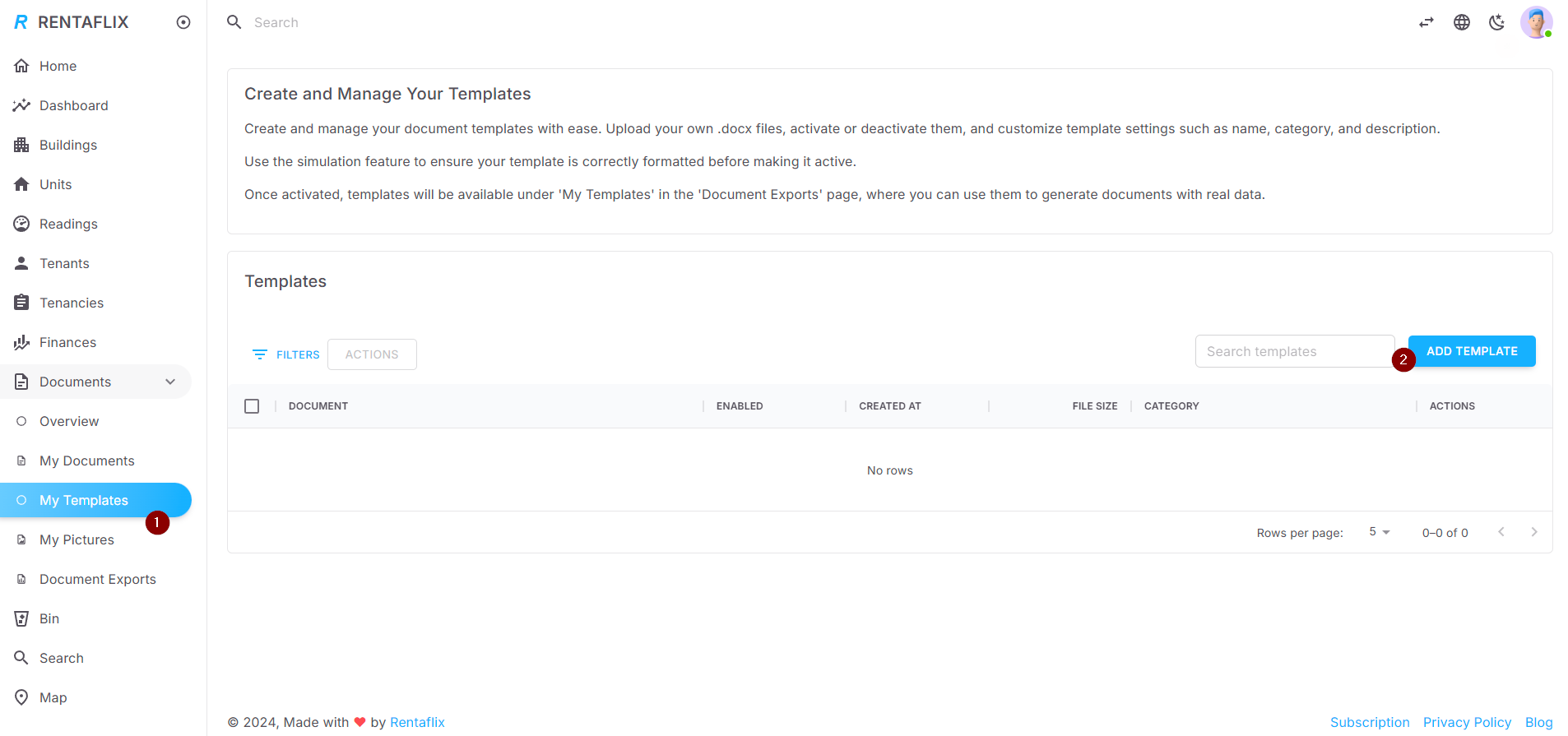
Navigate to 'My Templates' in the Rentaflix menu and click 'Add Template' to begin the process.
Setting Up Template Details
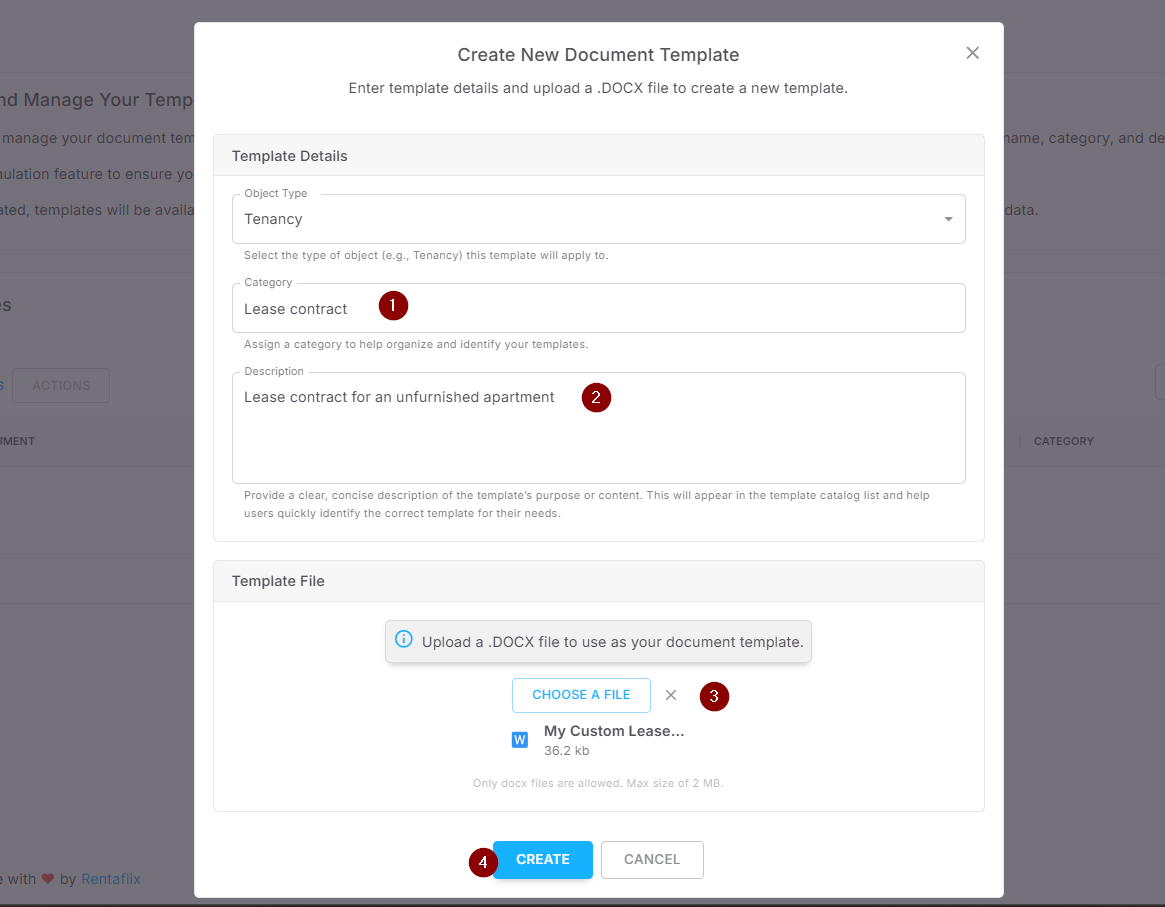
Fill in Category (e.g., Lease contract) and Description. Upload the prepared DOCX template file.
Click 'Create' to save the template.
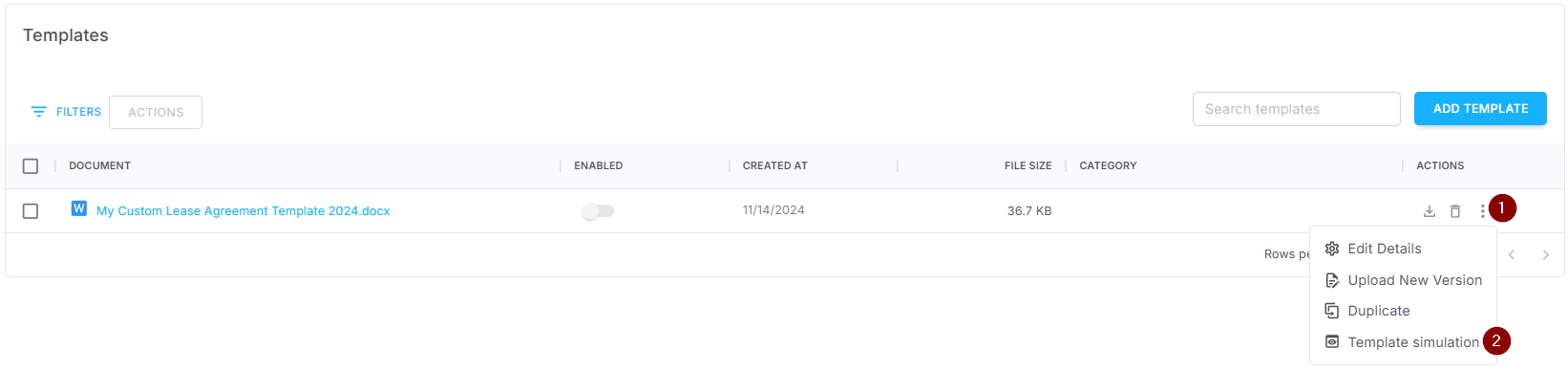
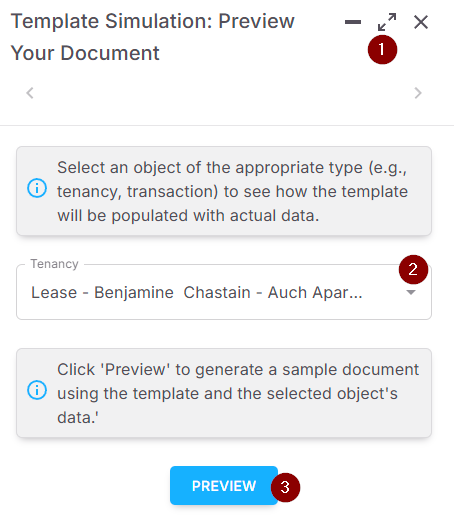
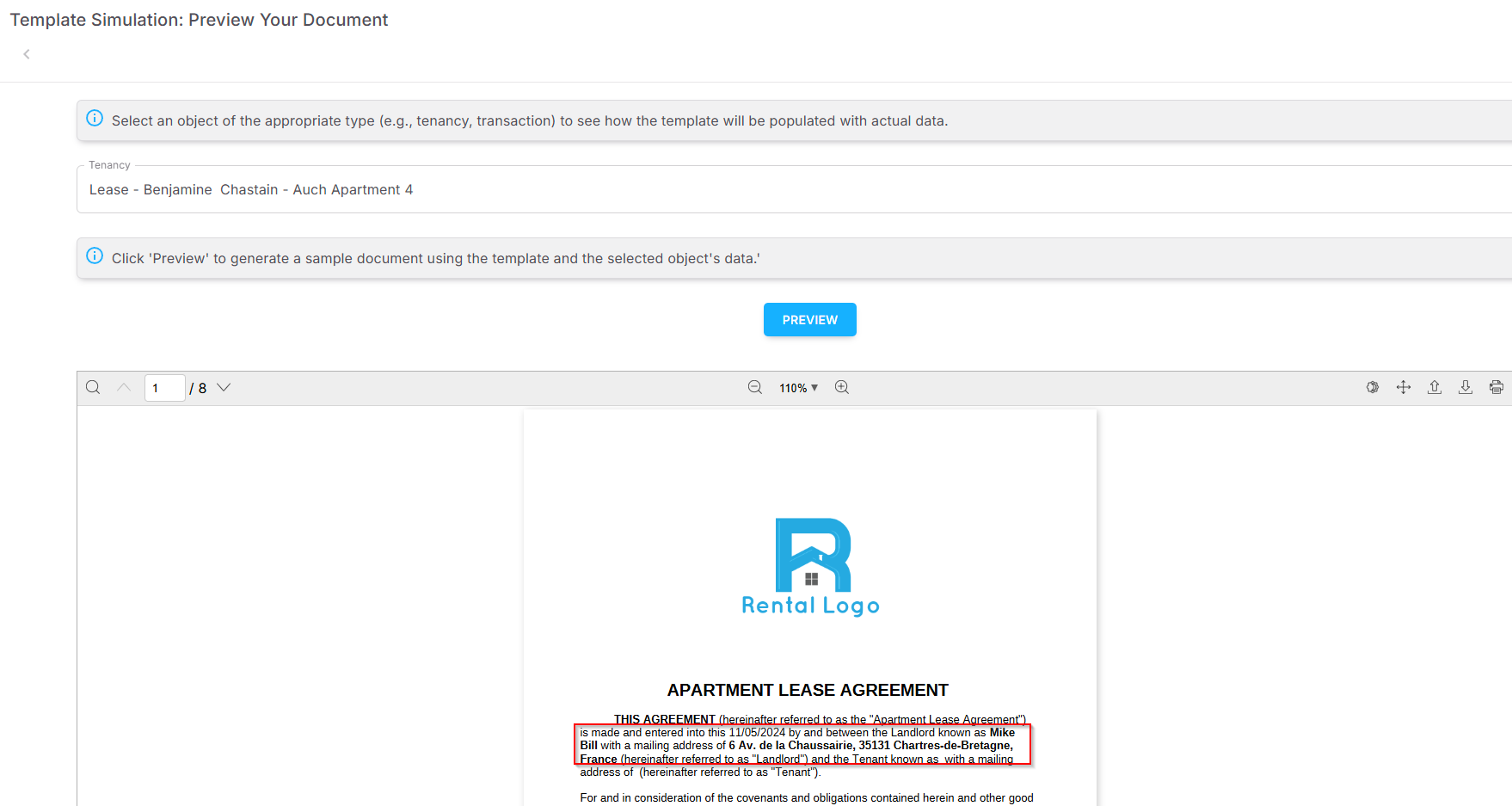
Previewing Your Template with Simulation
Before activating a template, you can simulate how it will look once filled with actual data. This allows you to verify that all dynamic fields appear correctly.
Activating the Template
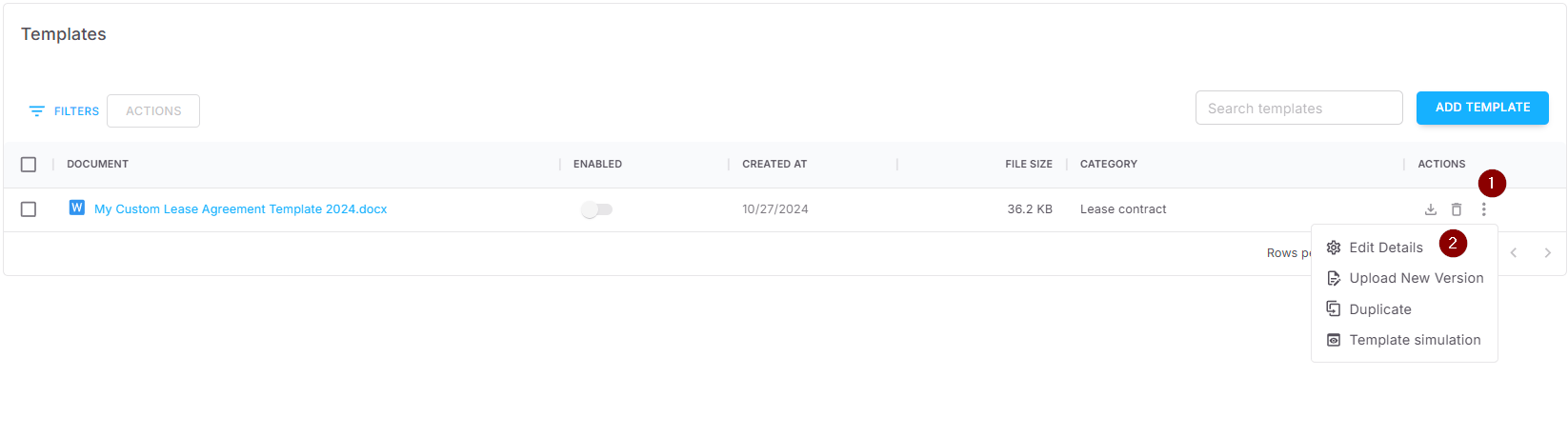
After creating the template, find it in the list and click 'Edit Details' from the Actions menu.
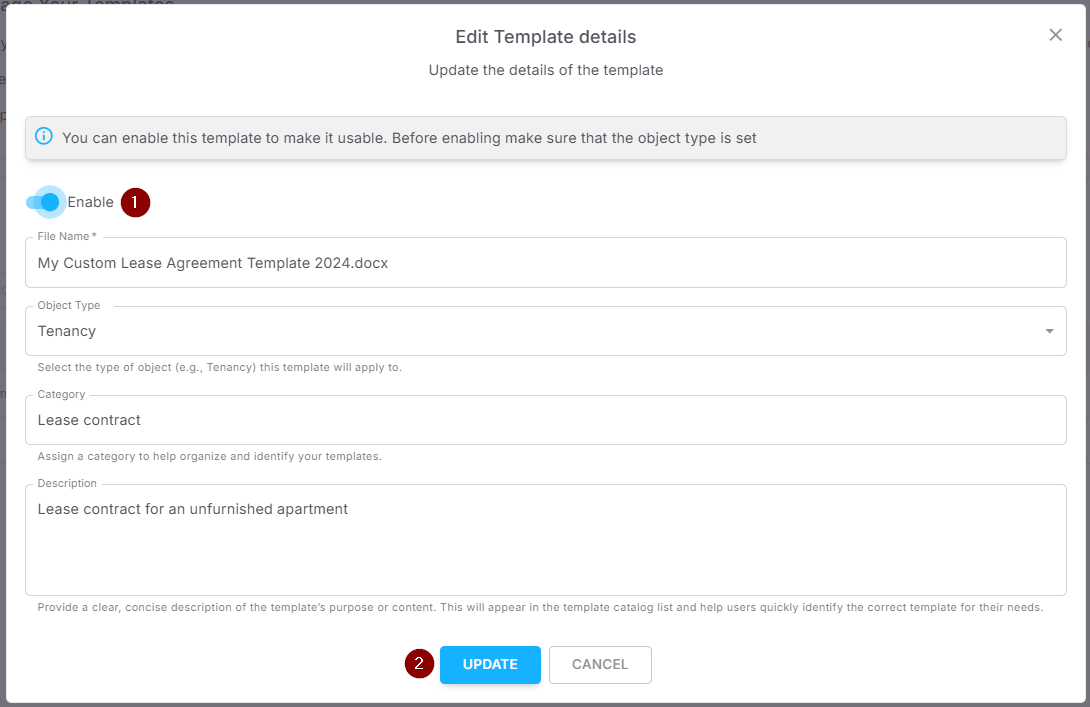
Toggle 'Enable' and click 'Update' to activate.
Verifying Template Activation
Once activated, confirm that the template is enabled in the list by checking the 'Enabled' status.

Using the Custom Template to Generate Documents
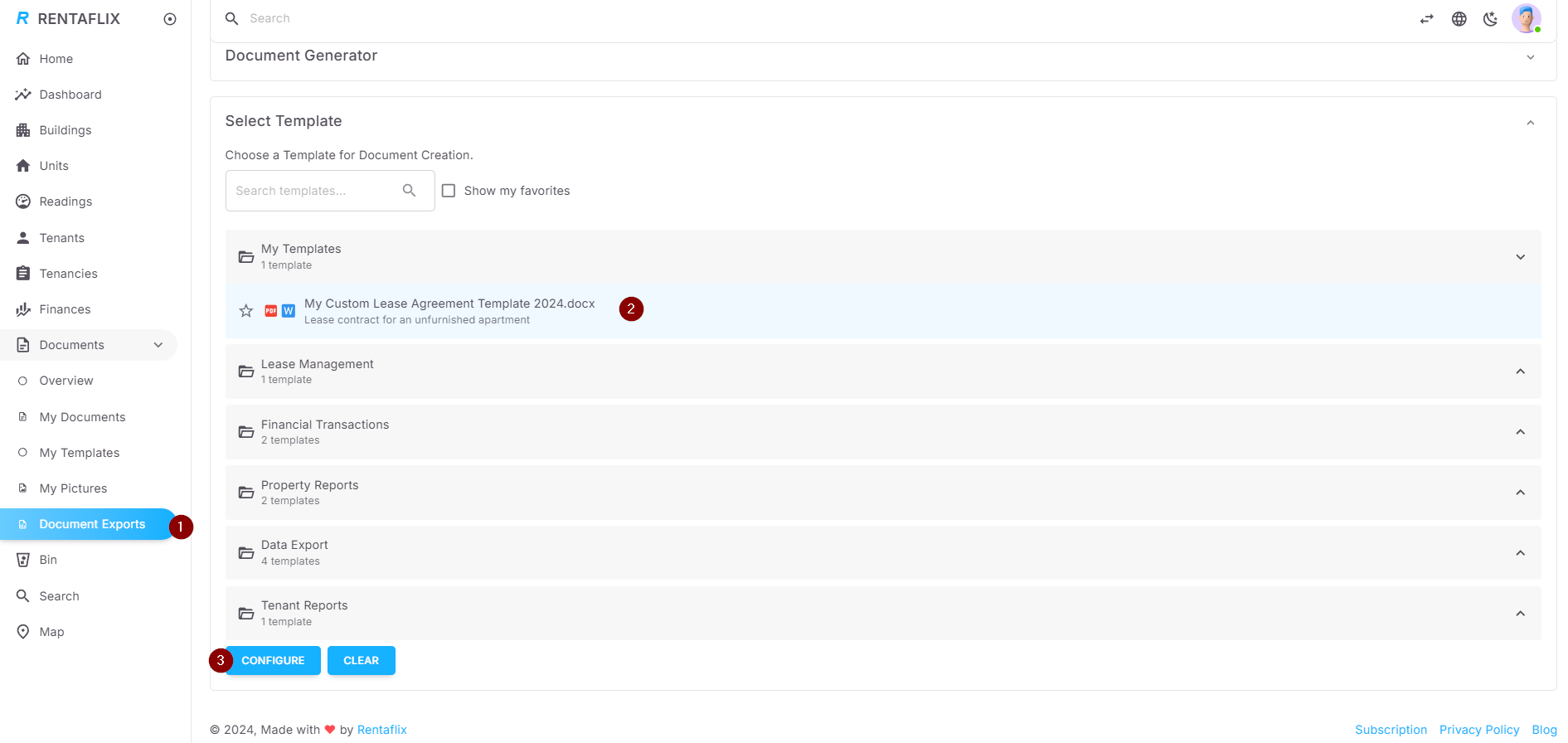
Go to 'Documents > Document Exports' and select your custom template from 'My Templates'.
Click 'Configure' to proceed.
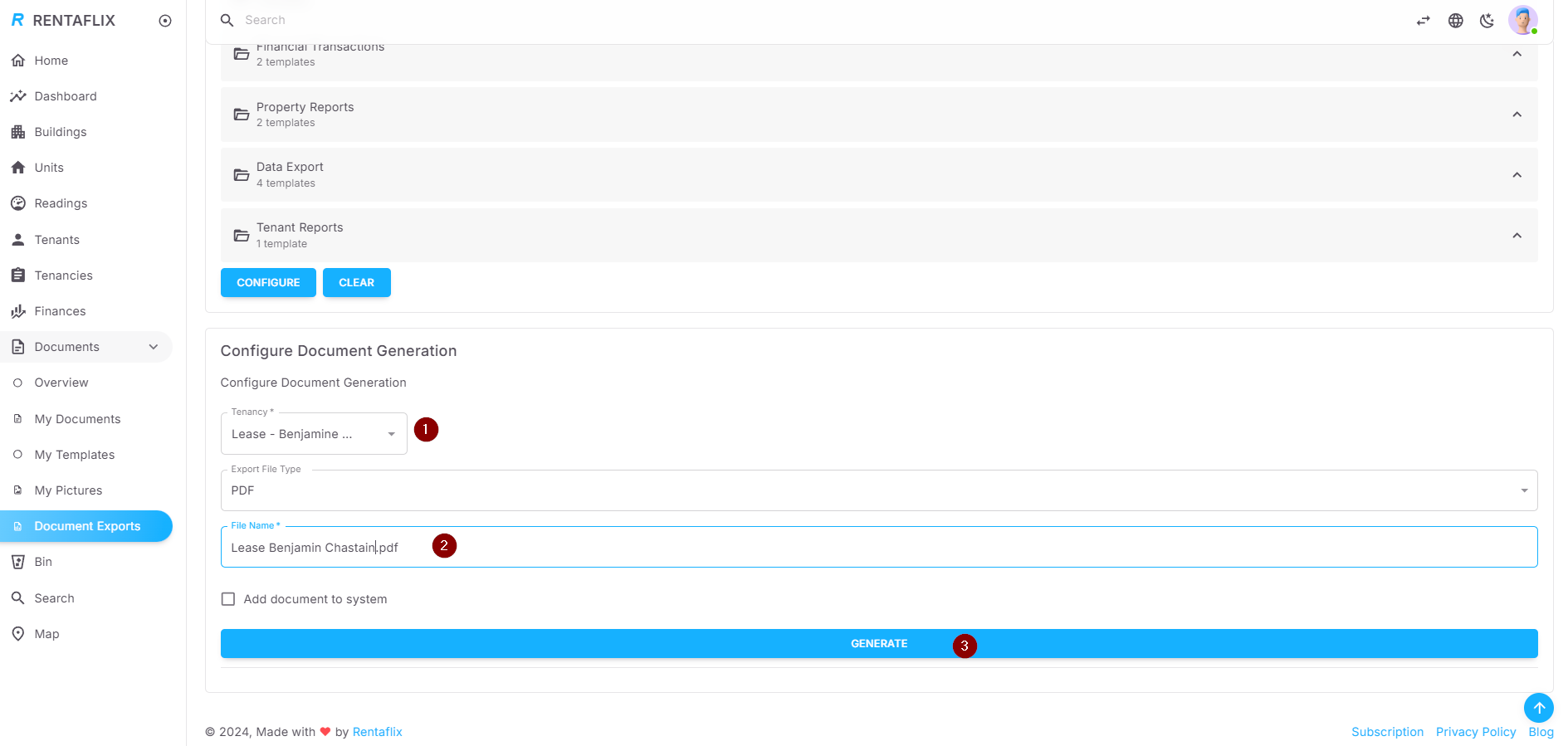
Configuring Document Generation
Select the tenancy, set the file name, and choose the export type (PDF by default).
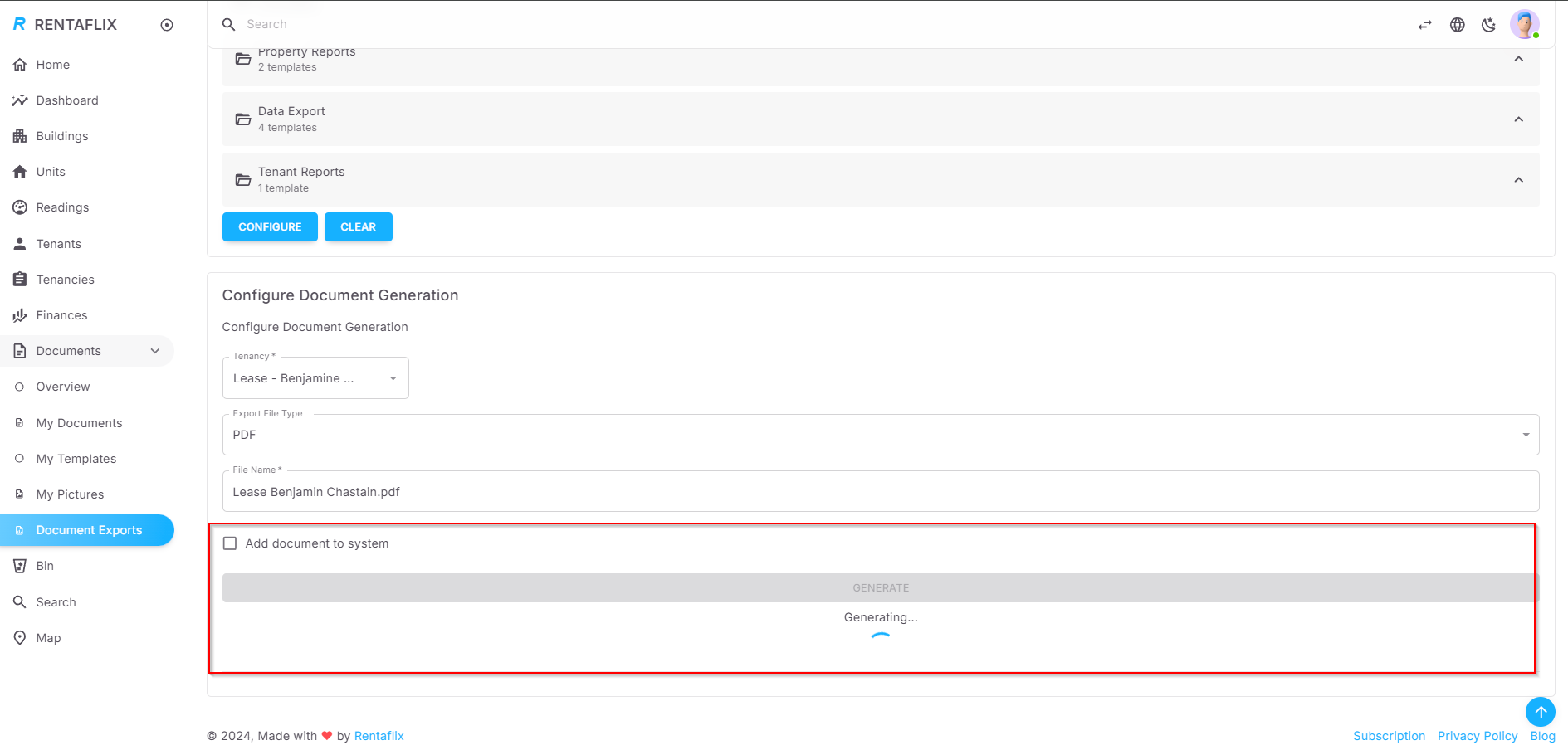
Click 'Generate' to start.
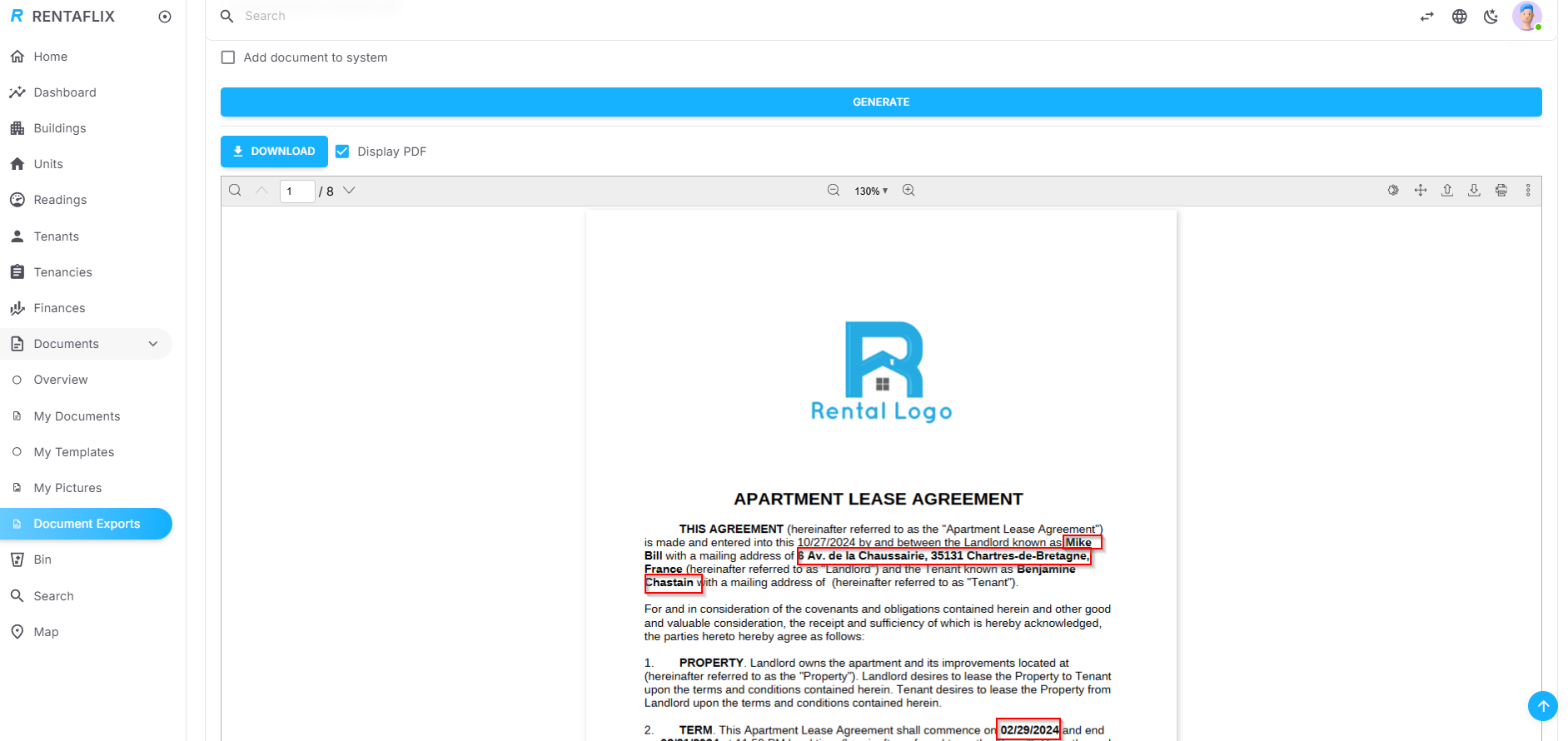
Document Generation and Download
Once generation completes, download the file or view it inline. Placeholders are replaced with tenancy-specific data.
Field Identifiers
Below is a list of field identifiers that can be used in your templates for dynamic content. Each template is associated with an object type, which determines the available data fields. Currently, the supported object type is Tenancy.
For the Tenancy object type, identifiers are grouped into multiple tables, each representing a specific aspect of the tenancy:
Identifier
{currentDate}{currency}{landlordName}{landlordAddress}{landlordPhone}{landlordEmail}{landlordStreet}{landlordPostalCode}{landlordCity}{landlordCountry}{tenancy.contractNumber}{tenancy.startDate}{tenancy.endDate}{tenancy.tenancyDuration}{tenancy.tenancyDurationMonths}{tenancy.numberOfResidents}{tenancy.baseRent}{tenancy.rentCharges}{tenancy.totalRent}{tenancy.deposit}{tenancy.depositDate}{tenancy.additionalTerms}{tenancy.rentDueOnDay}{tenancy.paymentSchedule}{tenancy.paymentMethod}{tenancy.moveInDate}{tenancy.moveOutDate}{tenancy.noticePeriod}{tenancy.noticeDeadline}{tenancy.rentalType}{tenancy.remainingDeposit}{tenancy.notes}{tenancy.baseRentTax}{tenancy.rentChargesTax}{tenancy.currency}{tenant.fullName}{tenant.firstName}{tenant.lastName}{tenant.email}{tenant.phone}{tenant.birthDate}{tenant.placeOfBirth}{tenant.nationality}{tenant.profession}{tenant.monthlyIncome}{tenant.address}{tenant.notes}{tenant.phones}{tenant.gender}{tenant.age}{tenant.addressStreet}{tenant.addressPostalCode}{tenant.addressCity}{tenant.addressCountry}{tenant.otherOccupants}{tenant.identification.type}{tenant.identification.number}{tenant.identification.expiry}{tenant.description}{tenant.website}{unit.name}{unit.description}{unit.unitType}{unit.size}{unit.rooms}{unit.floor}{unit.currency}{unit.address}{unit.residenceType}{unit.bedrooms}{unit.livingRooms}{unit.bathrooms}{unit.parkings}{unit.equipments}{unit.kitchens}{unit.addressStreet}{unit.addressPostalCode}{unit.addressCity}{unit.addressCountry}
Description
- The current date on which the document is being generated. Format: DD/MM/YYYY.
- The default currency used in your Rentaflix space, e.g., EUR, USD.
- The full name of the landlord.
- The complete address of the landlord, formatted as a single line, e.g., "123 Main St, City, Postal Code".
- Contact phone number of the landlord.
- Email address of the landlord.
- Street address of the landlord.
- Postal code of the landlord's address.
- City of the landlord's address.
- Country of the landlord’s address.
- The contract number for this tenancy.
- The currency used for payments in this tenancy, e.g., EUR, USD.
- The start date of the tenancy. Example 01/15/2024
- The end date of the tenancy.Example 12/31/2024
- Total duration of the tenancy in months, calculated from start and end dates.It is empty if the tenancy's end date is not set
- Total duration of the tenancy in years, calculated from start and end dates.It is empty if the tenancy's end date is not set
- The base rent amount agreed upon, excluding any additional charges. Example 1,500
- The tax applied to the base rent amount, commonly relevant for commercial rentals or in jurisdictions where rent tax is required. This field represents the tax amount added to the base rent. Example 182.34
- The amount designated for additional service charges associated with the tenancy, such as utilities or service fees Example 500.00
- The tax applied specifically to the additional service charges. This field is relevant in cases where service charges or utilities are taxed separately from the base rent, providing a breakdown of tax amounts applied to these additional charges. Example 58.34
- The total rent, including base rent, taxes, and additional charges. Example 1,800
- Payment schedule for the tenancy, e.g., monthly, quarterly.
- Preferred method of payment, e.g., Cash, Bank Transfer.
- Day of the month when the rent is due, e.g., 3 for third of every month.
- Number of residents authorized in the unit.
- Deposit amount held for this tenancy.
- Date when the deposit was paid.
- Notice period required before ending the tenancy, expressed in months.)
- The date the tenant moved in.
- The date the tenant moved out, if applicable.
- Additional notes related to the tenancy.
- Additional terms or clauses that may be unique to the specific lease agreement.
- Full name of the tenant, derived from first and last names for personal tenants, or company name for company tenants.
- First name of the tenant.
- Last name of the tenant.
- Email address of the tenant.
- Primary phone number for the tenant, if multiple numbers are available.
- List of phone numbers of the tenant (comma separated)
- Gender of the tenant, e.g., Male, Female.
- Birthdate of the tenant.
- Age of the tenant, calculated from birthdate (for personal tenants).
- Place of birth of the tenant.
- Nationality of the tenant.
- Profession or occupation of the tenant.
- Monthly income of the tenant, if recorded. Example 2,500
- Additional notes related to the tenant.
- Full address of the tenant.
- Street address of the tenant's address.
- Postal code of the tenant's address.
- City of the tenant's address.
- Country of the tenant's address.
- List of other occupants (comma separated) associated with the tenant, e.g., spouse or dependents.
- Type of identification document, e.g., ID Card, Passport.
- ID document number.
- Expiration date of the ID document.
- Brief description of the company.
- Website URL of the company.
- The name or label of the unit, e.g., "Apartment 101" or "Office 2A".
- A description of the unit, which may include general notes or details about the unit.
- Type of unit, e.g., Residential, Commercial, Parking, or Land.
- Size of the unit in square meters.
- Number of rooms in the unit, if applicable.
- The currency associated with the unit for rental and purchase, e.g., EUR, USD.
- Full address of the unit.
- Street address of the unit's address.
- Postal code of the unit's address.
- City of the unit's address.
- Country of the unit's address.
- Type of residence, e.g., apartment, studio, house.
- Number of living rooms in the unit.
- Number of bedrooms in the unit.
- Number of bathrooms in the unit.
- Number of parking spaces associated with the unit.
- List of amenities or features available, e.g., terrace, communal heating, CCTV.
- Number of kitchens in the unit.